
Should I Ditch React Native?


I have a confession to make. Even when I'm building the most simple of features, I'll sometimes spend an unreasonable amount of time trying to convince myself it's a good idea. And not just convince myself. I'll frame it like it's someone else's opinion I need to win over. Like there are two engineers living in my head, and one of them isn't budging until the other one makes a proper case.
I touched on a version of this in an earlier post, Time To Convince, where I talked about letting problems sit before rushing to solve them. What I didn't fully admit back then is that the "letting it sit" part often looks like a full internal debate, complete with a side that's stubbornly against whatever the other side wants to do.
This time it's a bigger question than usual, and it crept up on me recently while I was digging through crash reports in Sentry for Care Friends, the mobile app I've been building with React Native for the past two years. A few too many of those crashes had that familiar "if only this was native" flavour to them, and before I knew it, one half of my brain had opened a case for ditching React Native entirely and learning Swift and Kotlin properly.
The annoying thing is, I'm not even sure that half of my brain is right. It might just be wishful thinking brought on by one too many Reanimated stack traces... So consider this post me thinking out loud, in public, weighing up two years of React Native evidence against a hunch that native might have saved me some grief 😅

TLDR;
- Expo has made React Native development genuinely brilliant for the past two years, especially for someone maintaining a mobile app largely solo
- A run of hard-to-reproduce crashes (mostly courtesy of React Native Reanimated) has me wondering if native would have been more stable
- Realistically though, going native would mean learning Swift and Kotlin from scratch and maintaining two codebases instead of one, which is a big ask when it's mostly just me
Remember Xamarin?
Before any of this React Native soul-searching, Care Friends was built with Xamarin Forms. It worked fine for a good while, right up until Microsoft decided it didn't want to support it anymore. Xamarin Forms hit end of life, and the official guidance was pretty clear about where everyone was supposed to go next: .NET MAUI.
I did look into it. Microsoft even has a whole migration guide dedicated to walking you through the process. But at the same time this was happening, Microsoft also announced they were shutting down App Center, which was the service we relied on to actually get builds out to the App Store and Google Play. So I wasn't just facing a framework migration, I was facing a framework migration and a deployment pipeline migration, at the same time, for the same app.

That was the point where I decided if I was going to be rebuilding a chunk of the app's foundations anyway, I might as well properly weigh up my options rather than just taking the "safe" MAUI path by default. And that's how I ended up looking at React Native, and more specifically, Expo.
Where Expo shines 😍
React Native wasn't a complete gamble for me. I'd used it in previous roles, so I already had a rough idea of what I was getting myself into. I'd even experimented with Tamagui at one point, which lets you share a single codebase across both web and mobile. That wasn't the goal here though, our web app is a completely separate beast, so I wasn't trying to unify the two. I just needed a solid way to build the mobile app on its own.
What I hadn't used much before was Expo, and specifically Expo Application Services (EAS). Two years in, I can safely say it's been a bit of a lifesaver.
Local development is smooth. Spinning up a simulator and iterating on changes just works, without the usual native tooling headaches I remembered from years gone by. But the bit that's genuinely changed how I work is the preview builds. EAS lets me create a "preview" build that anyone can install by scanning a QR code, no App Store, no Google Play, no waiting around.

That might not sound like much, but it completely changed our UAT process. Instead of only getting proper testing coverage once a build hit TestFlight or the Google Play beta channel, I could get a much wider group of people internally testing changes early, just by sending them a QR code. Issues that would have previously surfaced late, right before a release, now get caught much earlier.
A typical preview build is about as simple as:
eas build --profile preview --platform allAnd that's it. A few minutes later, I've got a build ready to share, no fiddling with provisioning profiles or signing certificates required.
Once that workflow proved itself locally, the next step was making sure builds could be triggered without me needing to be sat at my laptop running commands. I set up a pipeline in Azure DevOps to handle that, so a build for a given environment and platform is just a parameterised job away:
parameters:
  environment: ""
  appName: ""
  configName: ""
  platform: ""
  profile: ""

jobs:
  - deployment: Deploy_${{ parameters.configName }}_${{ parameters.environment }}
    displayName: "Deploy ${{ parameters.appName }} Apps (${{ parameters.environment }})"
    environment: ${{ parameters.environment }}
    strategy:
      runOnce:
        deploy:
          steps:
            - template: ../steps/prepare_build.yml

            - script: npm install -g eas-cli
              displayName: "Install EAS CLI"

            - script: eas build --platform ${{ parameters.platform }} --profile ${{ parameters.profile }} --non-interactive --auto-submit
              displayName: "Deploy ${{ parameters.appName }} apps"
              env:
                EXPO_TOKEN: $(EXPO_TOKEN)
                CONFIG_NAME: ${{ parameters.configName }}
                HUSKY: 0
That --auto-submit flag is doing a lot of heavy lifting there too, once a build passes, it gets submitted straight to the relevant store without me having to babysit it. Between the QR code preview builds and this pipeline, getting something in front of testers or into TestFlight became one of the least stressful parts of the whole process.
Tailwind on mobile?! 🤯
One of the more pleasant surprises along the way was finding NativeWind, a package that lets you style React Native components using Tailwind classes. If you've worked with Tailwind on the web, it's exactly what it sounds like, the same className approach, just working on native components instead of divs and spans.
This was useful for more than just convenience. We could create a shared Tailwind config that spanned both the web and mobile projects, meaning our colours, spacing, and typography scales stayed consistent across platforms without having to redefine them twice.
// tailwind.config.js
module.exports = {
  content: ["./app/**/*.{js,jsx,ts,tsx}"],
  presets: [require("nativewind/preset")],
  theme: {
    extend: {
      colors: {
        primary: "#1E40AF",
        secondary: "#F59E0B",
      },
    },
  },
};
<View className="flex-1 items-center justify-center bg-white">
<Text className="text-primary text-xl font-semibold">
Hello there! 👋
</Text>
</View>
It's worth being honest though, this wasn't a fully automated "change it once, everywhere updates" setup. If the web app's colours or typefaces changed, someone still had to go and manually update the shared config to match. It kept things consistent, but it didn't remove the need for a human to notice the change and act on it. Still, having one place to update rather than hunting through styles scattered across the mobile codebase was a genuine time saver.
Where it starts to hurt
It hasn't all been smooth sailing though. Expo has its own ecosystem of "supported" packages, and there's a handy command, expo-doctor, that checks your dependencies against what's expected for your current SDK version. On the whole, this is a good thing. It means less variation between projects on the same Expo SDK version, and fewer surprises when something doesn't play nicely.
Except when it does the opposite of what you need it to 😩
I recently hit an issue caused by react-native-screens that was affecting navigation behaviour. Annoying, but not a mystery, the fix was already out there, sitting in the next patch version. So naturally, I went to install it.
npx expo install react-native-screens@latestAnd expo-doctor promptly told me off for it.

According to Expo's supported version range for my SDK, I wasn't supposed to be on that patch version yet. Never mind that it contained the actual fix for the bug I was trying to solve, the "supported" version was technically the one with the bug still in it. So I was left choosing between staying "supported" with a known issue, or going slightly off script to actually fix the problem.
I went off script, for what it's worth. But it's a good example of the trade-off with this whole ecosystem. The guardrails that normally save you time can occasionally box you into a corner, right when you need the flexibility to just fix the thing.
Reanimated: the repeat offender
If there's one package that shows up disproportionately often in our crash reports, it's React Native Reanimated. Between Sentry and the crash stats sitting in the Google Play Console, it's become a familiar name, and not in a good way.
The frustrating part isn't just that the crashes happen, it's how difficult they are to actually reproduce. Mobile development has a fragmentation problem that's easy to forget about when you're testing on your own phone every day. Different manufacturers, different OS versions, different amounts of RAM, different GPU quirks. A crash that happens reliably on a three year old budget Android device might never show up on anything I own.
So I end up staring at a stack trace pointing somewhere deep inside Reanimated's native layer, with a device model I've never heard of, an OS version two majors behind, and no clean way to reproduce it locally. I can usually make an educated guess at the cause, tweak something defensively, ship it, and hope the crash rate drops. It's not a great feeling for someone who likes to actually understand a bug before fixing it.
This is probably the single biggest contributor to that "if only this was native" feeling I mentioned earlier. Whether native code would genuinely avoid these issues, or whether I'd just be trading them for a different set of native-only headaches, is a question I can't fully answer. But when you're staring down yet another Reanimated crash with a device you can't get your hands on, it's easy to convince yourself the grass is greener.
Rather than walk through every crash one by one, it's more useful to talk about the shapes these errors take, because they repeat.
Native memory failures
These are the ones where the app just falls over inside Reanimated's C++ layer, with zero frames of my own code anywhere near the stack:
EXC_BAD_ACCESS: Exception 1, Code 1, Subcode 13500579344645825961
KERN_INVALID_ADDRESS at 0xbb5bb162839725a9

at -[AnimationFrameQueue executeQueue:] (AnimationFrameQueue.mm:99)
at worklets::AnimationFrameBatchinator::flush::lambda::operator() (AnimationFrameBatchinator.cpp:50)
at worklets::WorkletRuntime::runSync<T> (WorkletRuntime.h:62)
at facebook::jsi::Function::call (jsi-inl.h:313)
...
at reanimated::ReanimatedModuleProxy::performOperations (ReanimatedModuleProxy.cpp:1117)
at reanimated::ReanimatedModuleProxy::commitUpdates (ReanimatedModuleProxy.cpp:1164)
at facebook::react::ShadowTree::commit (<unknown>)
at facebook::react::RootShadowNode::layoutIfNeeded (<unknown>)
at facebook::yoga::calculateLayout (<unknown>)
...
at facebook::react::ShadowNode::clone (<unknown>)
at folly::dynamic::hash (<unknown>)
A worklet fires, Reanimated commits into the shadow tree, Yoga recalculates layout, and somewhere in the middle of hashing a folly::dynamic it all falls over. Have a count of how many frames belong to me. Zero. The exact same call path shows up under a second issue too, except that one ends in a SIGABRT instead. Nearby in the same family is a std::bad_alloc whose entire "stack trace" is a worklet compiled down to a single line and Sentry politely telling me: "No stack trace available." 😑
Cross-runtime deadlocks and hangs
These are the scariest ones, because nothing crashes...the app just stops! On iOS, Reanimated's mount hook takes a lock as the shadow tree mounts and the main thread queues up behind it for seven full seconds. Android hides the same category of problem inside an ANR ("Application Not Responding") rather than a crash, which means it never reaches Sentry at all. I only found it by going and looking directly at the Play Console. The main thread in that report is completely innocent, sat idle waiting for work, while React Native's JS thread is buried dozens of frames deep serialising a worklet under a lock, calling into itself over and over. Same fundamental problem, just from a different platform.

Platform API mismatches
Not every Android ANR is exotic. One was just Android's accessibility service asking a deeply nested React Native view tree to describe itself, walking it on the main thread during a frame, until the input dispatcher gave up. Nobody did anything wrong here. Android's accessibility API assumes shallow view hierarchies, React Native produces deep, constantly reconciling ones, and the two assumptions quietly disagree...
The exception that actually behaves
And then there's the counter-example: a react-native-screens crash with a real class name, a real line number, and a one-patch-version fix waiting for me on GitHub. That's the version of this I can live with. The real problem is that when it breaks in C++, across a runtime boundary, in a stack where half the symbols didn't survive compilation, I stop being an engineer and start being someone who makes educated guesses and ships them hopefully 🤞.
New architecture migration pains
When Expo moved to support React Native's new architecture, not every package in the ecosystem was ready for it. Some maintainers turned updates around quickly. Others took a bit longer, which meant a stretch of messy, patchy workarounds just to keep things compiling.
The Firebase package we use for push notifications was, somewhat surprisingly, one of the stragglers. I say surprisingly because I'd assumed a package used by such a huge chunk of the React Native community would be near the front of the queue for new architecture support. Turns out I wasn't the only one hitting problems, there's a GitHub issue on the Firebase SDK repo describing almost the exact same dependency conflict I ran into, and a separate issue on react-native-navigation showing the same category of static linking problems the new architecture introduced for Firebase-adjacent packages. Small comfort, but comfort all the same.
In the meantime, the fix was to patch the Podfile to force some dependencies to compile "the old way", even while the rest of the app had moved on to the new architecture.
# Podfile
pre_install do |installer|
  installer.pod_targets.each do |pod|
    if pod.name.eql?('RNFBApp') || pod.name.eql?('RNFBMessaging')
      def pod.build_type
        Pod::BuildType.static_library
      end
    end
  end
end
It's the kind of workaround that does the job, but leaves you a little uneasy every time you upgrade a dependency, wondering if this is the version that finally breaks the patch.

To buy myself some breathing room, I leaned on the feature flag Expo provided to stay on the legacy architecture a little longer than I probably should have. Basically, I kept deferring the pain rather than actually fixing it. That worked right up until the SDK 55 beta changelog landed and made it clear the legacy architecture escape hatch wasn't going to be around forever. By the time SDK 55 actually shipped, I didn't have much choice left but to sit down and properly sort out the new architecture support, deferred pain and all. Turns out avoiding a problem for long enough just means a bigger version of the same problem shows up later, who knew 😅
Why I'm still doing this
Putting the crashes and the patched Podfiles aside for a second, it's worth zooming out and asking why I went down the React Native route in the first place. The honest answer is workflow. Care Friends is, for the most part, a solo effort. There isn't a dedicated iOS developer and a dedicated Android developer sat either side of me. There's just me, and whatever I can realistically keep on top of.
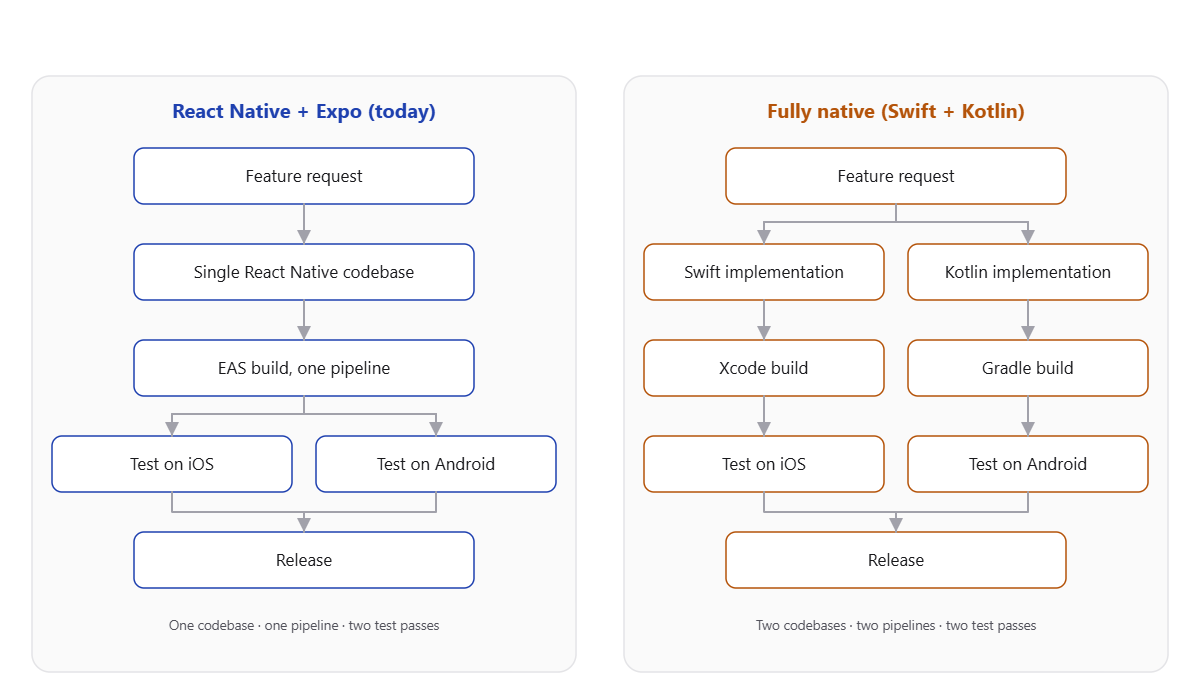
A single codebase means a bug fix, a feature, or a design tweak gets written once and tested on both platforms. Going native properly would mean writing (and maintaining, and debugging) two separate implementations of the same feature, in two different languages, with two different sets of platform quirks to learn. For a team of one, that's not a small trade-off.
And that's where I have to be honest about something. I was tempted to throw in some Swift and Kotlin code examples here, to make this feel like a proper head-to-head comparison. But that would be disingenuous. My experience with either language is close to non-existent. So this was never really a fair fight between "React Native" and "native". It's closer to "the ecosystem I already know reasonably well" versus "two ecosystems I'd be starting from zero in", while also being the only person maintaining the app. That's a very different question to answer than a neutral technical comparison would suggest.
So am I switching?
Right, time to let the two halves of my brain actually finish this argument.
The case for going native is real, but it's narrower than it felt at 4pm on a Friday staring at a Reanimated stack trace. Some of those crashes probably would be avoided, or at least easier to diagnose, with proper native tooling and none of the JS bridge in between. That's not nothing.
But the case for sticking with React Native and Expo is bigger than one bad afternoon of crash reports. Two years of EAS preview builds, a CI pipeline that just works, a shared Tailwind config keeping branding consistent, and a development workflow that lets one person actually keep on top of a mobile app without burning out. Going native wouldn't just mean rewriting the app, it would mean rewriting my entire workflow, from scratch, in two languages I'd be learning as I go, while still being the only person responsible for shipping it.
So, for now, the verdict is: I'm staying put. Not because React Native is perfect, it clearly isn't, but because the alternative isn't really "the same app, but more stable". It's "a different, slower way of working, with a steep learning curve, that might eventually be more stable, maybe, if I do a good enough job learning Swift and Kotlin along the way". That's a lot of maybes to trade against a workflow that's mostly been working fine.

Ask me again next time Sentry serves up a fresh batch of Reanimated crashes though. I make no promises about how long this verdict holds 😅
Wrapping up
So there you have it, a fairly public airing of an argument I've been having with myself, resolved for now in favour of the status quo. React Native and Expo have earned their keep over the past two years, warts, patched Podfiles, and all. The crashes are annoying, the occasional expo-doctor standoff is annoying, but none of it has been bad enough to outweigh the very real benefit of one person being able to actually maintain a mobile app without it becoming a second job on top of the job.
Maybe one day the calculation changes. Maybe Reanimated sorts itself out, or maybe I finally sit down and learn Swift and Kotlin properly instead of just complaining about not knowing them. But that's a decision for future me to debate with himself...